 User Guide
Web Clipper
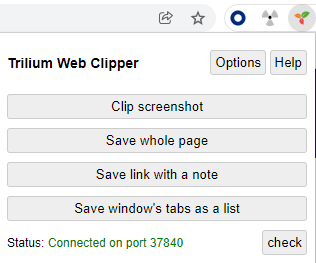
Trilium Web Clipper is a web browser extension which allows user to clip text, screenshots, whole pages and short notes and save them directly to Trilium Notes.
Supported browsers#
Trilium Web Clipper officially supports the following web browsers:
- Mozilla Firefox, using Manifest v2.
- Google Chrome, using Manifest v3. Theoretically the extension should work on other Chromium-based browsers as well, but they are not officially supported.
Obtaining the extension#
The extension is available from the official browser web stores:
Functionality#
- select text and clip it with the right-click context menu
- click on an image or link and save it through context menu
- save whole page from the popup or context menu
- save screenshot (with crop tool) from either popup or context menu
- create short text note from popup
Location of clippings#
Trilium will save these clippings as a new child note under a "clipper inbox" note.
By default, that's the Day Notes but you can override that by setting the label clipperInbox, on any other note.
If there's multiple clippings from the same page (and on the same day), then they will be added to the same note.
Keyboard shortcuts#
Keyboard shortcuts are available for most functions:
- Save selected text: Ctrl+Shift+S (Mac: ⌘+⇧+S)
- Save whole page: Alt+Shift+S (Mac: ⌥+⇧+S)
- Save screenshot: Ctrl+Shift+E (Mac: ⌘+⇧+E)
To set custom shortcuts, follow the directions for your browser.
- Firefox:
about:addons→ Gear icon ⚙️ → Manage extension shortcuts - Chrome:
chrome://extensions/shortcuts
Configuration#
The extension needs to connect to a running Trilium instance. By default, it scans a port range on the local computer to find a desktop Trilium instance.
It's also possible to configure the server address if you don't run the desktop application, or want it to work without the desktop application running.
Testing development versions#
Development versions are version pre-release versions, generally meant for testing purposes. These are not available in the Google or Firefox web stores, but can be downloaded from either:
- GitHub Releases by looking for releases starting with Web Clipper.
- Artifacts in GitHub Actions, by looking for the Deploy web clipper extension workflow. Once a workflow run is selected, the ZIP files are available in the Artifacts section, under the name
web-clipper-extension.
For Chrome#
- Download
trilium-web-clipper-[x.y.z]-chrome.zip. - Extract the archive.
- In Chrome, navigate to
chrome://extensions/ - Toggle Developer Mode in top-right of the page.
- Press the Load unpacked button near the header.
- Point to the extracted directory from step (2).
For Firefox#
- Navigate to
about:addons. - Select Extensions in the left-side navigation.
- Press the Gear icon on the right of the Manage Your Extensions title.
- Select Install Add-on From File…
- Point it to
trilium-web-clipper-[x.y.z]-firefox.zip. - Press the Add button to confirm.
Credits#
Some parts of the code are based on the Joplin Notes browser extension.