 User Guide
PDFs
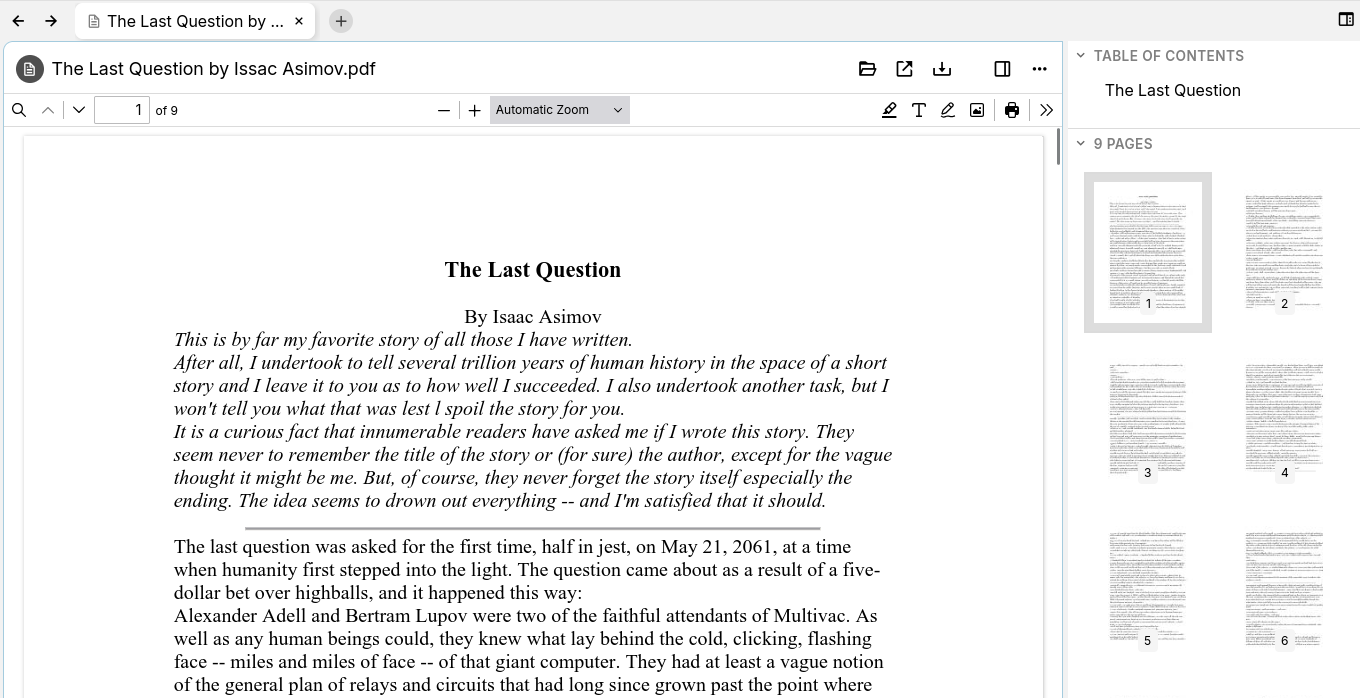
PDFs file can be uploaded in Trilium, where they will be displayed without the need to download them first.
Since v0.102.0, PDFs will be rendered using Trilium's built-in PDF viewer, which is a customization of Mozilla's PDF.js viewer (also built-in in the Mozilla Firefox browser). Versions prior to that render PDFs using the browser's default PDF viewer.
Features#
- The last page viewed and scroll position is maintained in between restarts or note navigations.
- Annotations (text, highlights) as well as comments. These are saved automatically.
- Forms can be filled.
- Can be printed or downloaded.
- Can be saved as a template and the content of the PDF will be copied over to the new note. This is especially useful in combination with annotations or filled forms.
- Integrates with the sidebar in the New Layout, by displaying the list of pages with thumbnails, table of contents and a listing of the annotations.
- Basic support for signatures (the hand-drawn ones, not proper digital signatures), similar to annotations. Signatures are stored and can be reused across multiple documents (up to 5).
Storing last position and settings#
For every PDF, Trilium will remember the following information:
- The current page.
- The scroll position, within the current page.
- The rotation of the page.
This makes it useful when reading large documents since the position is remembered automatically. This happens in the background, however it's recorded only a few seconds after stopping any scroll actions.
Annotations#
Since v0.102.0 it's possible to annotate PDFs. To do so, look for the annotation buttons on the right side of the PDF toolbar ( ).
).
Since v0.103.0:
- Annotations are disabled if the note is marked as Read-Only Notes.
- Comments can also be added, which is similar to highlights but also attach a text.
- The Right Sidebar also displays a list of annotations (highlights, comments), but only in the New Layout.
Supported annotations#
The following annotation methods are supported:
- Highlight
Allows highlighting text with one of the predefined colors.- The thickness is also adjustable.
- It's also possible to highlight the blank space, turning the feature more into a thicker pen.
- Text
Allows adding arbitrary text, with a custom color and size. - Pen
Allows free drawing on the document, with variable color, thickness and opacity. - Image
Allows inserting images from outside Trilium directly into the document.
Editing existing annotations#
Although annotations are stored in the PDF itself, they can be edited. To edit an annotation, press one of the annotation buttons from the previous section to enter edit mode and click on an existing annotation. This will reveal a toolbar with options to customize the annotation (e.g. to change a color), as well as the possibility to remove it.
How are annotations stored#
Annotations are stored directly in the PDF. When modifications are made, Trilium will replace the PDF with the new one.
Since modifications are automatically saved, there's no need to manually save the document after making modifications to the annotations.
The benefit of “baked-in annotations” is that they are also accessible if downloading (for external use outside Trilium) or sharing the note.
The downside is that the entire PDF needs to be sent back to the server, which can slow down performance for larger documents. If you encounter any issues from this system, feel free to report it.
Filling out forms#
Similar to annotations, forms are also supported by Trilium since v0.102.0. If the document has fields that can be filled-in, they will be indicated with a colored background.
Simply type text in the forms and they will be automatically saved.
Sidebar navigation#
See the dedicated section on PDFs in Outline tab.
Share functionality#
PDFs can also be shared using the Sharing feature. This will also use Trilium's customized PDF viewer.
If you are using a reverse proxy on your server with strict access limitations for the share functionality, make sure that [host].com/pdfjs directory is accessible. Note that this directory is outside the /share route as it's common with the rest of the application.
OCR#
PDFs are eligible for Text Extraction (OCR), which means that their text can be used in Search.